If you're storing everything in S3 Standard because "it's simpler," you're lighting money on fire. This isn't theoretical. This is production infrastructure reality. Most DevOps teams do this: - Upload everything to S3 Standard - Set up backups to S3 Standard - Store logs in S3 Standard - Archive compliance data in S3 Standard - Wonder why AWS bills look like phone numbers S3 has seven storage classes. You're using the most expensive one for everything. The problem: You're ignoring access patterns. The solution: Match access patterns to storage classes. It's not rocket science.
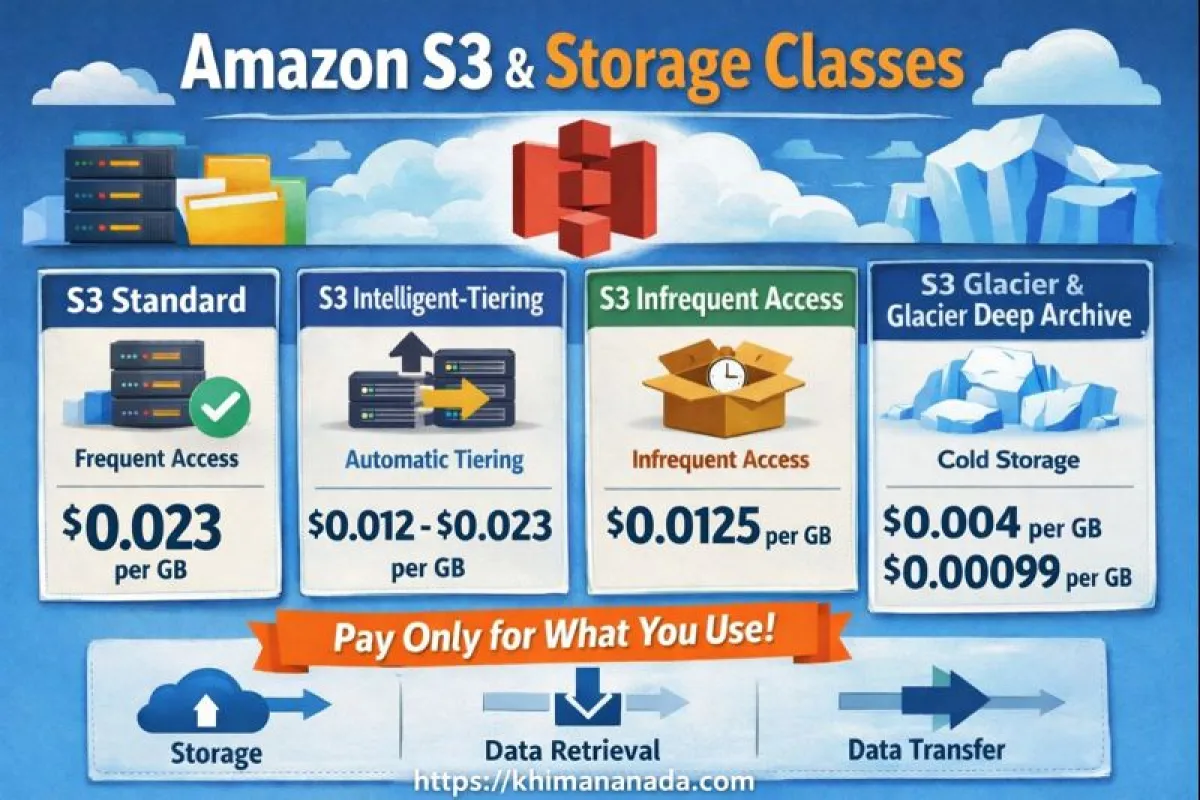
AWS S3 Storage Classes Comparison
| Storage Class | Price (per GB) | Retrieval Time | Best For |
|---|---|---|---|
| Standard | $0.023 | Instant | Active app data |
| Standard-IA | $0.0125 | Instant | Backups, monthly access |
| Glacier Instant | $0.004 | Instant | Compliance, audits |
| Deep Archive | $0.00099 | ~12 hours | Legal, long-term retention |
The Only Storage Classes That Matter
Forget the marketing fluff. Here are the four classes that matter in production: Standard: $0.023/GB per month - Instant retrieval - Active data, frequent access Standard-IA: $0.0125/GB per month - Instant retrieval - Monthly access, backups Glacier Instant: $0.004/GB per month - Instant retrieval - Quarterly access, compliance Deep Archive: $0.00099/GB per month - 12 hours retrieval - Yearly/never, legal holds Everything else is AWS trying to sell you more SKUs.
Standard: Your Default, Not Your Only Choice
When to use Standard: - Application data accessed daily/weekly - User uploads - CDN origins - Anything your app needs immediately When NOT to use Standard: - Backups older than 30 days - Log archives - Compliance data - "Just in case" files Standard costs 18x more than Deep Archive. That adds up fast.
Standard-IA: The Sweet Spot Everyone Ignores
Standard-IA (Infrequent Access) is the most underused class. Same retrieval time as Standard, half the cost. Perfect for: - Database backups (you need them fast when shit hits the fan) - Application configs and infrastructure backups - Monthly reports - User data accessed occasionally The catch: $0.01/GB retrieval fee. Don't use it for data accessed multiple times per month.
Glacier Instant: When Auditors Want It "Now"
Glacier Instant is for compliance teams who demand immediate access but never actually access the data. Real use cases: - Financial records (7-year retention) - Healthcare data (HIPAA requirements) - Legal discovery (stored but rarely needed) - Security logs (compliance but not monitoring) Pro tip: Set up lifecycle rules to move Standard → Standard-IA → Glacier Instant automatically.
Deep Archive: Legal Black Holes
Deep Archive is for data you hope to never see again but legally can't delete. Examples: - Email archives from employees who left - Source code from discontinued projects - Backup tapes migrated to cloud - Anything with "forever" retention policies The 12-hour retrieval isn't a bug—it's a feature. It forces you to think before restoring.
Real Production Examples
Scenario 1: SaaS Application
- User uploads: Standard - App backups (< 30 days): Standard-IA - App backups (> 30 days): Glacier Instant - Legal compliance: Deep Archive
Scenario 2: E-commerce Platform
- Product images: Standard - Order history: Standard-IA after 90 days - Financial records: Glacier Instant after 1 year - Customer emails: Deep Archive after 3 years
Scenario 3: DevOps Team
- Container images: Standard - CI/CD artifacts (< 30 days): Standard-IA - System backups: Glacier Instant after 90 days - Audit logs: Deep Archive after 2 years
Lifecycle Rules That Don't Suck
Stop managing transitions manually. Use lifecycle policies. Here's a production-ready example:
{"Rules": [{"Id": "CostOptimization","Status": "Enabled","Transitions": [{"Days": 30,"StorageClass": "STANDARD_IA"},{"Days": 90,"StorageClass": "GLACIER_IR"},{"Days": 365,"StorageClass": "DEEP_ARCHIVE"}]}]} Customize based on access patterns: - Hot data: Standard for 30 days - Warm data: Standard-IA for 60 days - Cold data: Glacier Instant for 275 days - Frozen data: Deep Archive forever
Cost Breakdown: Actual Numbers
100 TB stored for 1 year: Standard: $27,600 Standard-IA: $15,000 (Savings: $12,600 or 46%) Glacier Instant: $4,800 (Savings: $22,800 or 83%) Deep Archive: $1,188 (Savings: $26,412 or 96%) Real example: One client moved 500 TB of backups from Standard to Glacier Instant. Saved $138,000/year.
Common Mistakes That Kill Budgets
1. Storing Active Logs in Standard
Problem: Application logs in Standard forever Solution: Standard → Standard-IA after 30 days → Deep Archive after 365 days
2. Database Backup Overkill
Problem: All backups in Standard "for fast recovery" Solution: Recent backups in Standard-IA, older backups in Glacier Instant
3. Ignoring Lifecycle Rules
Problem: Manual storage class management Solution: Automate everything with lifecycle policies
4. Wrong Class for Access Pattern
Problem: Frequently accessed data in Glacier Solution: Match access frequency to storage class pricing
The Right Storage Class for Your Data
Ask yourself three questions: 1. How often is this accessed? - Daily = Standard - Weekly = Standard - Monthly = Standard-IA - Quarterly = Glacier Instant - Yearly = Deep Archive 2. How fast do I need it? - Immediately = Standard/IA/Glacier Instant - Eventually = Deep Archive 3. What's the retrieval cost? - High frequency = avoid retrieval fees - Low frequency = optimize storage cost
Final Reality Check
S3 storage classes aren't about technical complexity—they're about matching cost to usage patterns. The rules: - Standard: Active data only - Standard-IA: Backups and monthly-accessed data - Glacier Instant: C
Frequently Asked Questions
Which AWS S3 storage class is cheapest? S3 Glacier Deep Archive is the cheapest at around $0.00099 per GB, but retrieval takes up to 12 hours.
Is S3 Standard-IA cheaper than Standard? Yes. Standard-IA costs about 45% less but charges retrieval fees, so it’s best for infrequent access.
Can S3 storage classes be changed automatically? Yes. Use lifecycle rules to transition data between storage classes based on age or access patterns.
ompliance and quarterly-accessed data - Deep Archive: Legal requirements and "never" data Set up lifecycle rules, monitor your bills, and adjust based on actual access patterns. Stop overthinking it. Your AWS bill will thank you.