Table of Contents
LVM vs LVM-Thin: What’s the Real Difference and Why It Actually Matters
If you’ve spent any time managing Linux servers, Proxmox, or bare-metal storage, you’ve seen LVM and LVM-Thin pop up everywhere. And let’s be honest: most people pick one during install, forget about it, and only think about it again when disks are full or VMs start screaming.
This article cuts through the noise. We’ll break down what LVM and LVM-Thin really are, how they behave under pressure, where each one shines, where they fail hard, and which one you should actually use in 2026.
Quick Recap: What Problem Are We Solving?
Traditional disk partitioning is rigid. You allocate space upfront and pray you guessed right. LVM (Logical Volume Manager) exists to fix that.
At a high level, LVM lets you:
- Resize disks without downtime
- Pool multiple disks together
- Move data around without reinstalling
- Stop treating disks like they’re carved in stone
But LVM alone wasn’t enough for modern virtualization. That’s where LVM-Thin enters the chat.
Classic LVM (a.k.a. “Thick Provisioning”)
How LVM Works (Simplified)
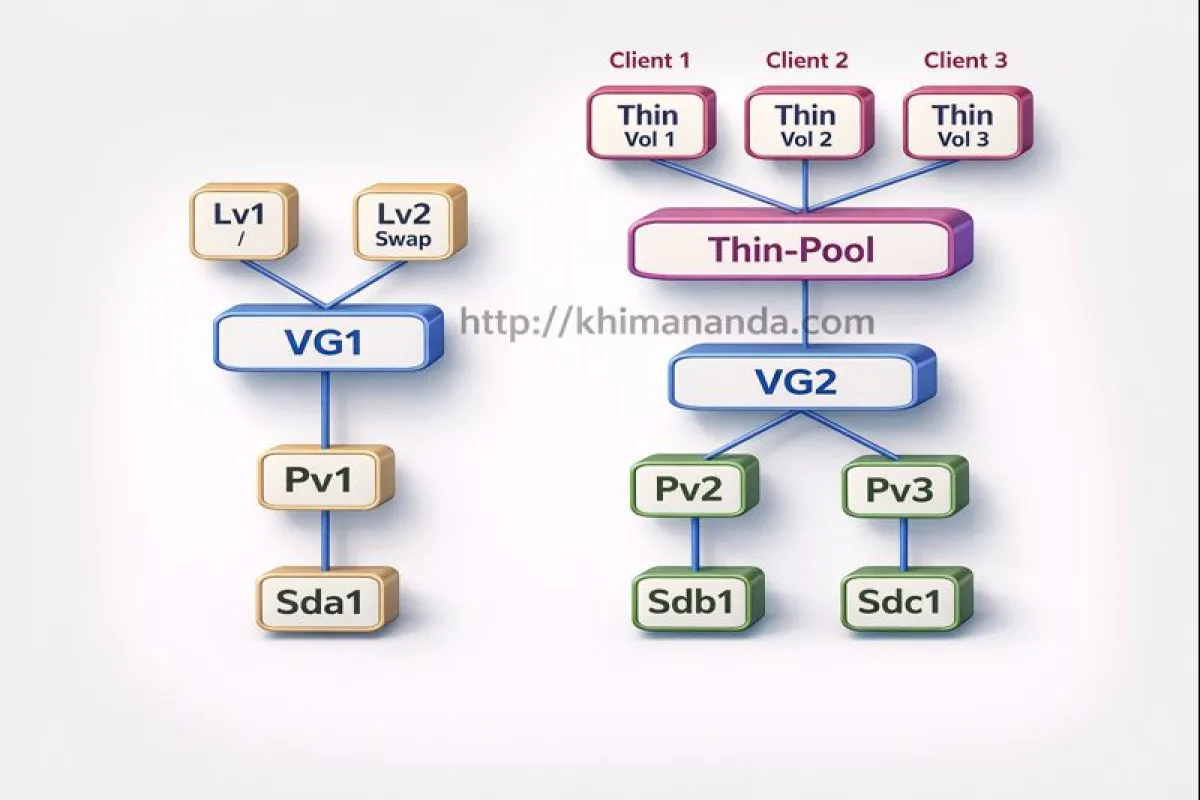
LVM has three core building blocks:
- Physical Volume (PV)
A disk or partition (e.g.,/dev/sdb,/dev/nvme0n1) - Volume Group (VG)
A pool made from one or more PVs - Logical Volume (LV)
Virtual disks carved out of the VG
When you create an LV, space is allocated immediately. If you create a 100 GB LV, that 100 GB is gone from the VG, whether you use it or not. This is called thick provisioning.
Pros of Classic LVM
- Predictable: If the LV exists, the space is guaranteed.
- Simple mental model: What you allocate is what you own.
- Stable as hell: No metadata gymnastics, fewer surprises.
- Great for databases: PostgreSQL, MySQL, MongoDB — they love predictability.
Cons of Classic LVM
- Wasted space: If you allocate 1 TB and only use 200 GB, the rest just sits there.
- Not VM‑friendly at scale: Over‑allocating disks kills flexibility.
- Snapshots are painful: Traditional LVM snapshots are slow, space‑hungry, and honestly outdated.
When Classic LVM Makes Sense
Use classic LVM if:
- You run databases
- You need guaranteed disk space
- You care about stability over flexibility
- You hate surprises at 3 AM
In other words: boring, safe, production‑grade storage.
LVM-Thin (Thin Provisioning Done Right)
LVM-Thin builds on top of LVM but changes one crucial thing: space is allocated only when data is written. That’s thin provisioning.
How LVM-Thin Works
Instead of creating normal LVs, you create:
- A Thin Pool (special LV)
- Multiple Thin Volumes inside that pool
You can create 10 VMs, each with a “100 GB disk,” even if your actual storage is only 500 GB.
Sounds dangerous? It can be — if you’re reckless.
Pros of LVM-Thin
- Massive space efficiency: No wasted disk.
- Fast, cheap snapshots: Perfect for backups and VM templates.
- Ideal for virtualization: Proxmox, KVM, OpenStack — all love thin pools.
- Clone-friendly: VM cloning becomes stupid fast.
Cons of LVM-Thin
- Overcommit risk: If the thin pool fills up, VMs freeze, filesystems go read-only, chaos ensues.
- More complex: You must monitor pool usage. No excuses.
- Metadata corruption = pain: Rare, but when it happens, recovery isn’t fun.
- Not ideal for write-heavy DBs: Thin provisioning + heavy random writes = bad vibes.
The #1 Rule of LVM-Thin
Never let the thin pool hit 100%. Ever.
Once metadata or data space is exhausted:
- VMs pause
- Writes fail
- You’re restoring from backups while questioning life choices
Monitoring is not optional here.
Performance: Let’s Kill the Myths
LVM Performance
- Near‑native disk performance
- Minimal overhead
- Predictable I/O latency
LVM-Thin Performance
- Slight overhead due to metadata tracking
- Negligible for most VM workloads
- Can degrade under heavy random writes
Real talk: For web servers, app servers, CI runners, and general VMs — you won’t notice a difference. For high‑IO databases? Classic LVM still wins.
Snapshots: Night and Day Difference
LVM Snapshots (Classic)
- Copy-on-write
- Eats space fast
- Slows down over time
- Needs babysitting
LVM-Thin Snapshots
- Lightweight
- Fast
- Designed for frequent use
- Perfect for backups and rollbacks
This is one of the biggest reasons Proxmox defaults to LVM-Thin.
Monitoring: Optional vs Mandatory
Classic LVM
Monitoring is nice to have.
LVM-Thin
Monitoring is non-negotiable. You must track:
- Thin pool data usage
- Metadata usage
- Auto-extend thresholds
If you’re not monitoring, you’re playing storage roulette.
Real-World Use Cases
Use Classic LVM When
- Running PostgreSQL, MySQL, MongoDB
- You want zero overcommit risk
- Disk usage is predictable
- Downtime is unacceptable
Use LVM-Thin When
- Running Proxmox or KVM
- Hosting many VMs or containers
- Using snapshots heavily
- Storage efficiency matters more than guarantees
Proxmox Context (Because This Is Real Life)
In Proxmox:
local-lvm= LVM-Thin- Great for VM disks
- Terrible if you forget to monitor it
If you’re repurposing disks or moving backups around:
- Do NOT store backups inside thin pools
- Backups should live on classic LVM, ZFS, or plain directories
Thin pools are for active workloads, not cold storage.
LVM vs LVM-Thin: Quick Comparison
| Feature | LVM | LVM-Thin |
|---|---|---|
| Provisioning | Thick | Thin |
| Space Efficiency | Medium | High |
| Overcommit Risk | None | High |
| Snapshots | Weak | Excellent |
| VM Workloads | Okay | Excellent |
| Databases | Excellent | Risky |
| Complexity | Low | Medium–High |
Final Verdict (No Sugar-Coating)
- Classic LVM is safe, boring, and reliable.
- LVM-Thin is powerful, flexible, and dangerous if mismanaged.
If you’re disciplined, monitor properly, and understand storage behavior — LVM-Thin is a weapon. If you want peace of mind and sleep — classic LVM still slaps.
The real skill isn’t picking one. It’s knowing where each one belongs.