Table of Contents
Fixing MongoDB “invalid opcode” error on Proxmox (AVX issue)
MongoDB may crash immediately on startup with an “invalid opcode” or status=4/ILL core-dump when running inside a virtual machine. This usually isn’t a configuration problem; it means the MongoDB binary tried to execute a CPU instruction that the guest CPU doesn’t support.
Why it happens
MongoDB 5.0 and later require the AVX instruction set. If the VM’s CPU type doesn’t expose AVX instructions, MongoDB will crash as soon as it starts.
On Proxmox, this often happens if you use a generic or compatibility CPU type such as x86-64-v2-AES. That model omits AVX, so MongoDB can’t run.
How to check AVX support
Inside your VM, run:
lscpu | grep -i avx If the output shows avx or avx2, AVX is available. If there’s no output, the VM doesn’t have AVX support and MongoDB 5/6 will fail.
Recommended fix: set CPU type to “host”
In Proxmox:
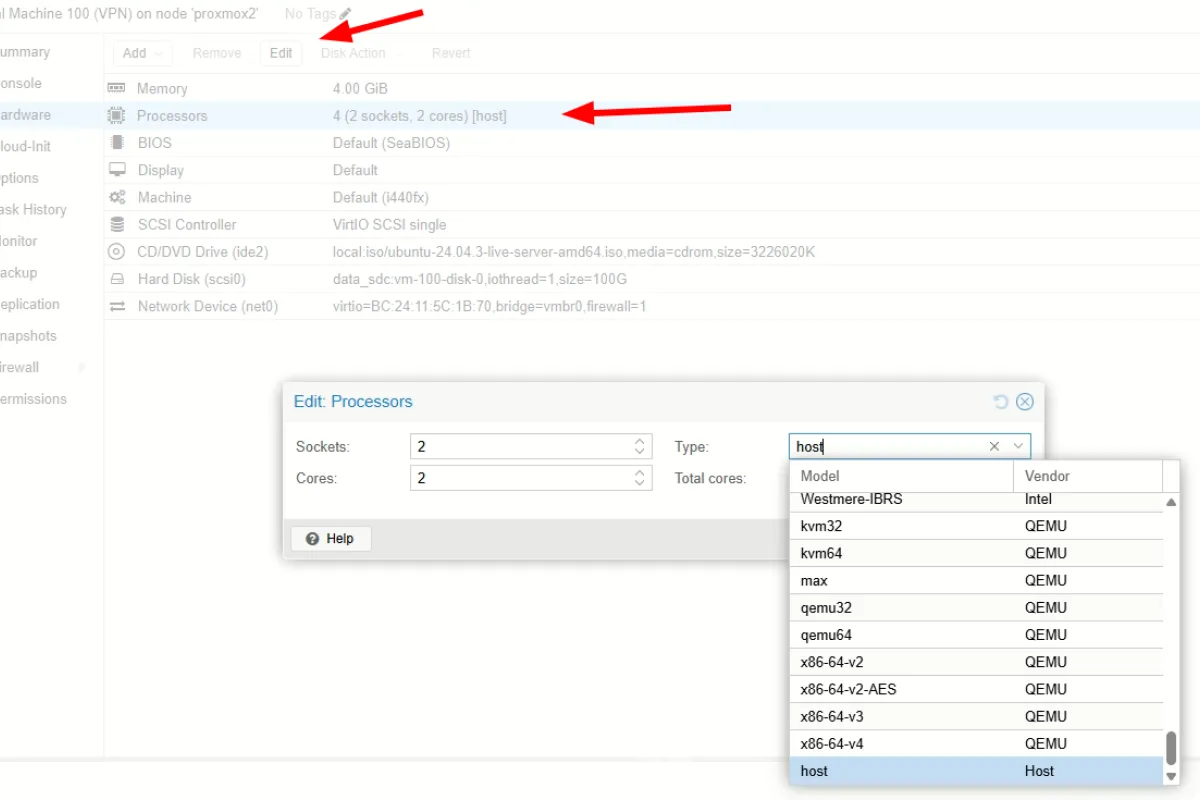
- Open the VM settings and go to Hardware → Processors.
- Click Edit.
- Change Type to
host. - Shut down the VM completely.
- Start the VM again.
Using the host CPU type exposes all the host CPU features, including AVX. After a full power cycle, MongoDB should start normally.
Alternative workaround
If your underlying hardware truly lacks AVX (e.g., very old CPUs), you can run MongoDB 4.4, which is the last major version that doesn’t require AVX.
Summary
The “invalid opcode” error in MongoDB on Proxmox is almost always caused by the VM CPU not exposing AVX instructions. Switching the VM’s CPU type to host, then power-cycling, resolves the issue. If you can’t expose AVX, use MongoDB 4.4 instead.