Table of Contents
If your team is still using shared IAM user credentials to run Terraform, it's time to switch to AWS SSO (IAM Identity Center). In this article, I'll walk you through how I migrated our multi-account Terraform setup from a shared deployment IAM user to individual SSO-based authentication for both local development and CI/CD pipelines.
Our Previous Setup
We had a classic multi-account Terraform setup with three AWS accounts:
- Shared/management account - Hosted the S3 state bucket, DynamoDB lock table, and custom Terraform modules in S3
- Dev account - Development environment
- Live/prod account - Production environment (with additional
live-euandlive-drworkspaces)
A single IAM user called deployment lived in the shared account. It had an access key that was shared across the team and stored as GitHub secrets for CI/CD. The Terraform provider used assume_role to switch into the target account:
provider "aws" {
  region = "us-east-1"
  assume_role {
    role_arn     = "arn:aws:iam:::role/deployment"
    session_name = "deployment"
  }
}
The S3 backend stored state and locks in the shared account:
backend "s3" {
  bucket         = "my-tf-states"
  region         = "us-east-1"
  key            = "core.tfstate"
  dynamodb_table = "terraform-locks"
}
And our GitHub Actions workflow used static IAM keys:
- name: Configure AWS Credentials
  uses: aws-actions/configure-aws-credentials@v4
  with:
    aws-access-key-id: ${{ secrets.AWS_ACCESS_KEY_ID }}
    aws-secret-access-key: ${{ secrets.AWS_SECRET_ACCESS_KEY }}
    aws-region: us-east-1
Custom modules were stored in an S3 bucket and referenced like:
module "my_module" {
  source = "s3::/my-tf-modules/1.0.41/my-module.zip"
}
This setup worked, but it had serious problems:
- No individual accountability - CloudTrail logs showed
deploymentuser for every change, making it impossible to trace who did what - Security risk - Static keys can leak, get committed to git, or be shared insecurely
- Key rotation pain - Rotating one shared key means updating it everywhere
- No MFA enforcement - Long-lived access keys bypass MFA requirements
The Solution: AWS SSO + OIDC
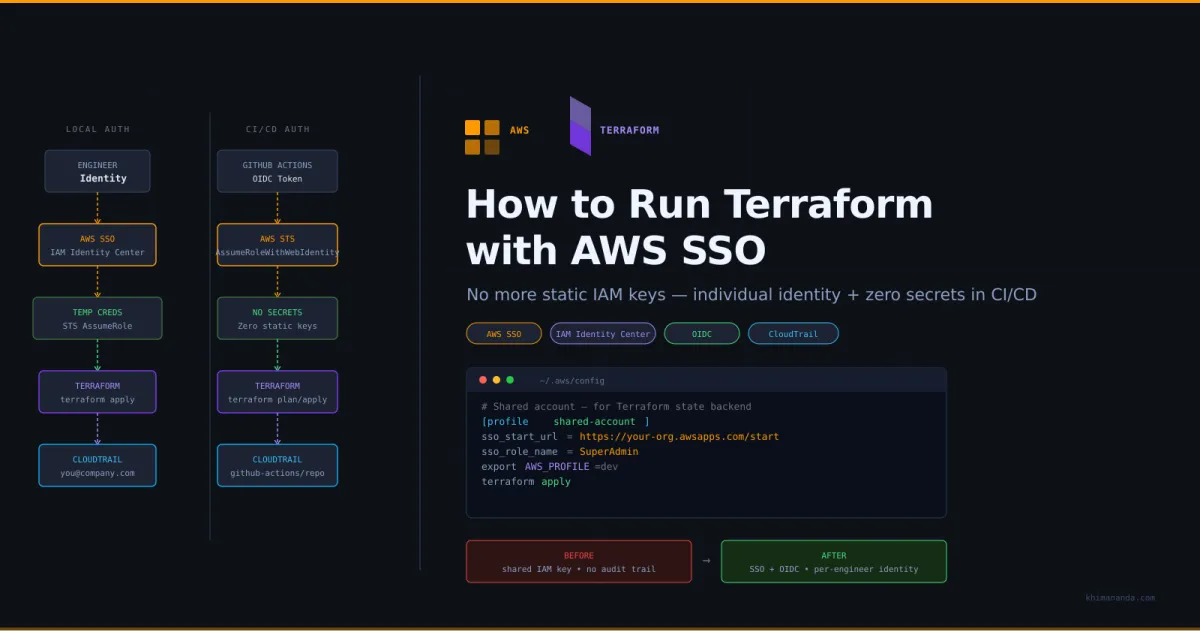
With AWS IAM Identity Center (SSO), each DevOps engineer authenticates with their own identity. For CI/CD, GitHub Actions uses OIDC federation - no static keys stored as secrets.
Local Development:
  Engineer -> AWS SSO Login -> Temporary Credentials -> Terraform

CI/CD (GitHub Actions):
  GitHub Actions -> OIDC Token -> AWS STS -> Temporary Credentials -> Terraform
Step 1: Remove the assume_role Block
Since each engineer will authenticate directly via SSO into the target account, there's no need for assume_role. Terraform will use whatever credentials are in the environment.
Before:
provider "aws" {
  region = "us-east-1"
  assume_role {
    role_arn     = "arn:aws:iam:::role/deployment"
    session_name = "deployment"
  }
}
After:
provider "aws" {
  region = "us-east-1"
}
Step 2: Fix the S3 Backend for Cross-Account State Access
This was the trickiest part. Our state bucket and DynamoDB lock table lived in the shared account, but now we're authenticating directly into dev/live accounts via SSO.
The problem: Terraform's S3 backend always looks for the DynamoDB lock table in the caller's account. So when authenticated as dev account, it looks for the lock table in dev - not in the shared account where it actually exists.
The fix: Add a profile to the backend config pointing to the shared account:
backend "s3" {
  bucket         = "my-tf-states"
  region         = "us-east-1"
  key            = "core.tfstate"
  dynamodb_table = "terraform-locks"
  profile        = "shared-account"
}
This ensures both S3 and DynamoDB calls go to the shared account, while the provider uses your SSO profile for the target account.
You'll also need an S3 bucket policy on the state bucket to allow cross-account access:
{
  "Version": "2012-10-17",
  "Statement": [
    {
      "Sid": "TerraformStateAccess",
      "Effect": "Allow",
      "Principal": {
        "AWS": [
          "arn:aws:iam:::root",
          "arn:aws:iam:::root"
        ]
      },
      "Action": [
        "s3:ListBucket",
        "s3:GetObject",
        "s3:PutObject",
        "s3:DeleteObject"
      ],
      "Resource": [
        "arn:aws:s3:::my-tf-states",
        "arn:aws:s3:::my-tf-states/*"
      ]
    }
  ]
}
After changing the backend config, reinitialize:
terraform init -reconfigure
Step 3: Set Up AWS SSO Profiles
Each engineer adds profiles to their ~/.aws/config - one per account:
# Dev account
[profile dev]
sso_start_url = https://your-org.awsapps.com/start/#/
sso_region = us-east-1
sso_account_id =
sso_role_name = SuperAdmin
region = us-east-1

# Production account
[profile prod]
sso_start_url = https://your-org.awsapps.com/start/#/
sso_region = us-east-1
sso_account_id =
sso_role_name = SuperAdmin
region = us-east-1

# Shared account (for Terraform state backend)
[profile shared-account]
sso_start_url = https://your-org.awsapps.com/start/#/
sso_region = us-east-1
sso_account_id =
sso_role_name = SuperAdmin
region = us-east-1
Replace SuperAdmin with your SSO permission set name.
Step 4: Run Terraform Locally
# Login to SSO (opens browser for authentication)
aws sso login --profile dev
aws sso login --profile shared-account

# IMPORTANT: Clear any old static credentials first
unset AWS_ACCESS_KEY_ID
unset AWS_SECRET_ACCESS_KEY
unset AWS_SESSION_TOKEN

# Set the profile for the target account
export AWS_PROFILE=dev

# Verify you're using the SSO role (not the old IAM user)
aws sts get-caller-identity
# Should show: arn:aws:sts:::assumed-role/AWSReservedSSO_SuperAdmin_.../[email protected]

# Run Terraform
terraform init
terraform workspace select dev
terraform plan
terraform apply
Gotcha: If AWS_ACCESS_KEY_ID / AWS_SECRET_ACCESS_KEY are set in your environment, they take precedence over AWS_PROFILE. Always unset them first. I spent a while debugging this one - aws sts get-caller-identity kept showing the old user/deployment identity.
Step 5: Set Up GitHub Actions with OIDC
We already had an OIDC provider configured in AWS using the unfunco/oidc-github/aws module. If you don't have one yet, add it:
module "oidc_github" {
  source  = "unfunco/oidc-github/aws"
  version = "1.8.0"

  github_repositories = [
    "your-org/your-terraform-repo"
  ]

  attach_admin_policy = true
}

output "oidc_role_arn" {
  value = module.oidc_github.iam_role_arn
}
Make sure your Terraform repo is in the github_repositories list. Apply this in each AWS account where GitHub Actions needs access.
Then update the GitHub Actions workflow:
Before (static keys):
permissions:
  contents: read

steps:
  - name: Configure AWS Credentials
    uses: aws-actions/configure-aws-credentials@v4
    with:
      aws-access-key-id: ${{ secrets.AWS_ACCESS_KEY_ID }}
      aws-secret-access-key: ${{ secrets.AWS_SECRET_ACCESS_KEY }}
      aws-region: us-east-1
After (OIDC):
permissions:
  id-token: write   # Required for OIDC
  contents: read

steps:
  - name: Configure AWS Credentials
    uses: aws-actions/configure-aws-credentials@v4
    with:
      role-to-assume: ${{ secrets.AWS_OIDC_ROLE_ARN }}
      aws-region: us-east-1
Key changes: - Added id-token: write permission (required for GitHub to issue OIDC tokens) - Replaced aws-access-key-id / aws-secret-access-key with role-to-assume
Set AWS_OIDC_ROLE_ARN per GitHub environment: - development environment: OIDC role ARN from your dev account - production environment: OIDC role ARN from your prod account
Step 6: Upgrade AWS Provider and Modules
After switching to SSO, I hit this error on terraform plan:
An argument named "enable_classiclink" is not expected here.
This happened because we were on AWS provider 4.67 and VPC module 3.18.1. EC2-Classic was fully retired by AWS, and these older versions still reference deprecated classiclink attributes.
The fix was upgrading both:
# Provider: 4.67 -> 5.x
required_providers {
  aws = {
    source  = "hashicorp/aws"
    version = "~> 5.0"
  }
}

# VPC module: 3.18.1 -> 5.16.0
module "vpc" {
  source  = "terraform-aws-modules/vpc/aws"
  version = "5.16.0"
}
Then run:
terraform init -upgrade
Step 7: Migrate Module Sources from S3 to GitHub
This one caught me off guard. We had custom Terraform modules stored in an S3 bucket:
module "my_module" {
  source = "s3::/my-tf-modules/1.0.41/my-module.zip"
}
After switching to SSO, terraform init failed with:
NoCredentialProviders: no valid providers in chain
The root cause: Terraform's module downloader uses the Go AWS SDK internally, which does not respect AWS_PROFILE when downloading S3 sources. It only looks for environment variables or instance roles.
I tried using the full HTTPS URL (s3::https://s3.amazonaws.com/...) but got the same error. The cleanest solution was switching to GitHub as the module source - our modules were already in a GitHub repo:
module "my_module" {
  source = "github.com/your-org/your-tf-modules//my-module?ref=v1.0.93"
}
This uses git credentials instead of AWS credentials for module downloads. No more S3 auth issues.
Common Pitfalls
1. Old credentials overriding SSO
Environment variables take precedence over AWS_PROFILE. If you previously had static keys exported:
unset AWS_ACCESS_KEY_ID AWS_SECRET_ACCESS_KEY AWS_SESSION_TOKEN
2. DynamoDB lock table not found in the right account
Terraform looks for the DynamoDB table in the caller's account, not the state bucket's account. Without profile in the backend config, you'll get:
AccessDeniedException: User is not authorized to perform: dynamodb:PutItem
Use profile in the backend config so both S3 and DynamoDB resolve to the same shared account.
3. S3 module downloads failing with NoCredentialProviders
The Terraform module downloader ignores AWS_PROFILE for S3 sources. Either switch to GitHub-hosted modules or export credentials before terraform init:
eval "$(aws configure export-credentials --profile dev --format env)"
terraform init
4. Missing id-token: write permission in GitHub Actions
OIDC requires the workflow to have id-token: write permission. Without it, the OIDC token request fails silently.
5. Backend configuration changed error
After adding profile to the backend, you'll see:
Error: Backend configuration changed
Run terraform init -reconfigure to use the new backend config without migrating state.
Summary
| Component | Before | After |
|---|---|---|
| Local auth | Shared deployment IAM user + static keys | Individual SSO login per engineer |
| CI/CD auth | Static keys in GitHub secrets | OIDC federation (no secrets needed) |
| Provider config | assume_role to deployment role | No assume_role (uses env credentials) |
| State backend | Direct access from shared account | profile pointing to shared account |
| Audit trail | "deployment" user for everyone | Individual engineer identity in CloudTrail |
| Key rotation | Manual, painful, shared | Automatic, per-session, no keys to manage |
| Module sources | S3 bucket (breaks with SSO) | GitHub repo (uses git credentials) |
| AWS provider | 4.67 | ~> 5.0 |
| VPC module | 3.18.1 | 5.16.0 |
The migration took some troubleshooting, but the security benefits are significant. Every terraform apply is now traceable to an individual engineer in CloudTrail, credentials are short-lived and automatically rotated, and there are no static keys to leak or manage.
If you're working with Linux servers as part of your infrastructure, check out LinuxTools.app (https://linuxtools.app/) - a handy reference for command-line tools and utilities that I use daily alongside Terraform.
Written by Khimananda Oli (https://khimananda.com). Follow me for more DevOps, AWS, and infrastructure content.